Run your restaurant faster, smarter, and better than ever before.
The all-in-one Restaurant Operating Platform for modern F&B businesses.
- Accept QR code and online orders, process GCash/Maya/Card payments via PayMongo, run promo codes & loyalty rewards, track sales, manage inventory and monitor operations all in real time from anywhere.
- No hidden fees. No commissions. No extra hardware. No complicated setup.
- Built for restaurants, cafés, food parks, milk tea shops, bars, bakeries, and growing F&B business across the Philippines.
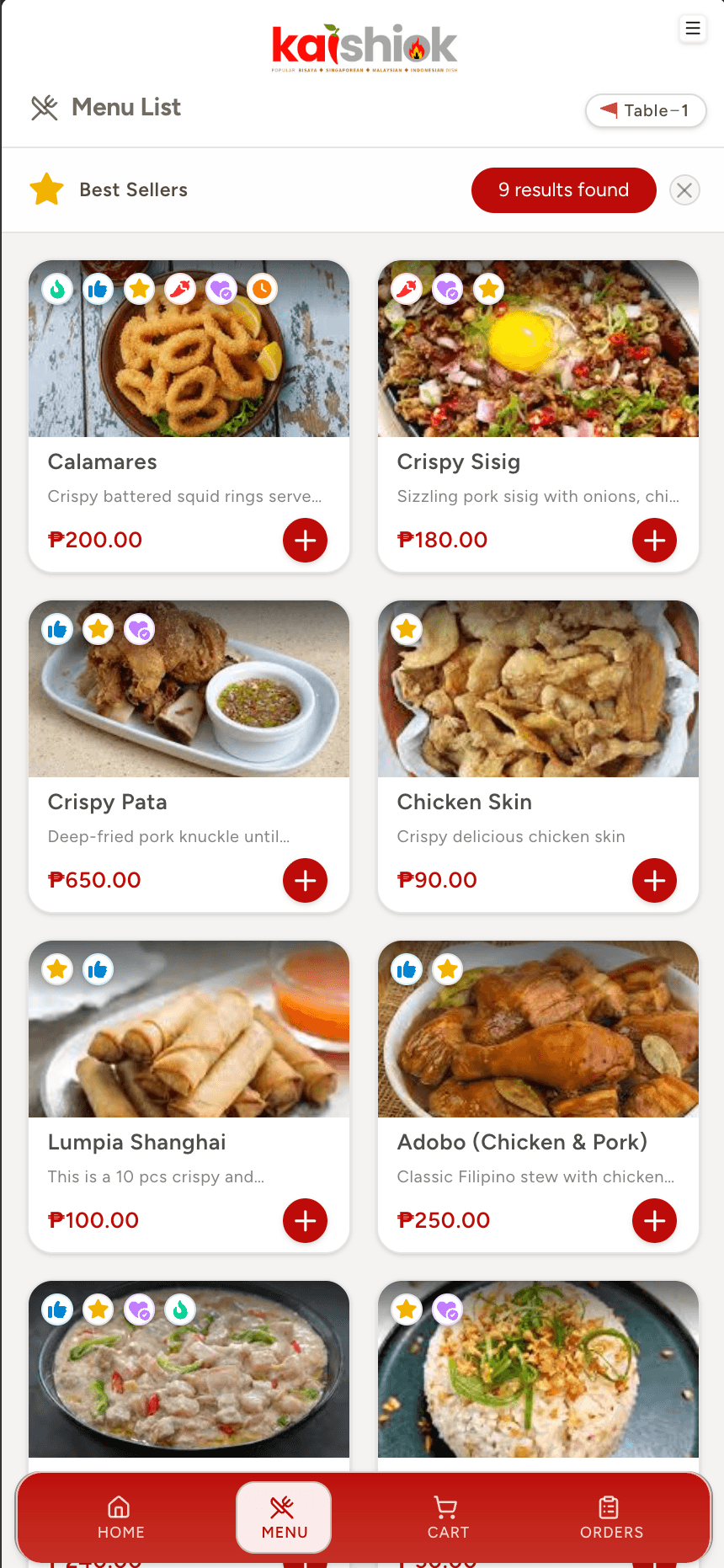 // Customer
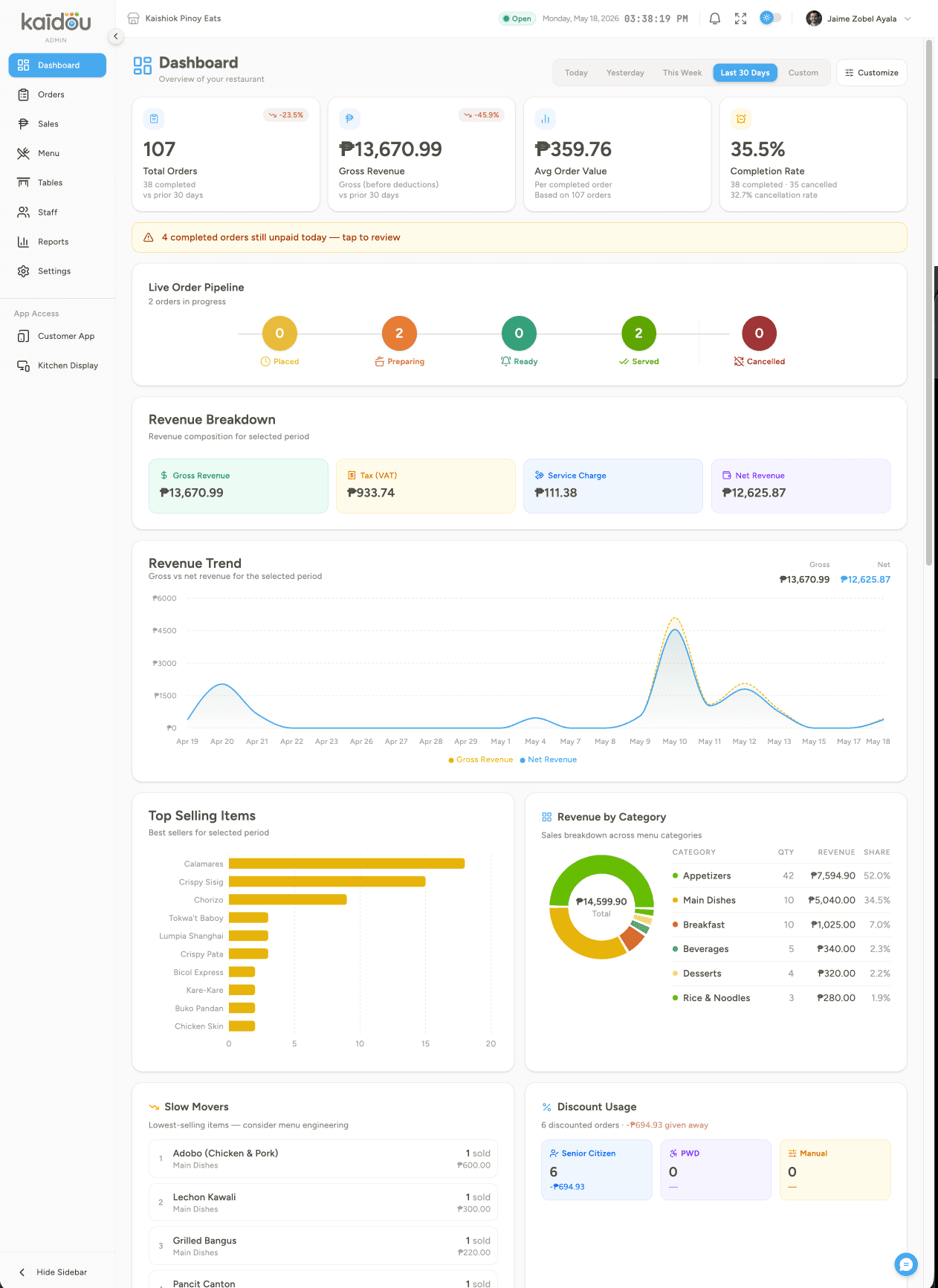 // Admin
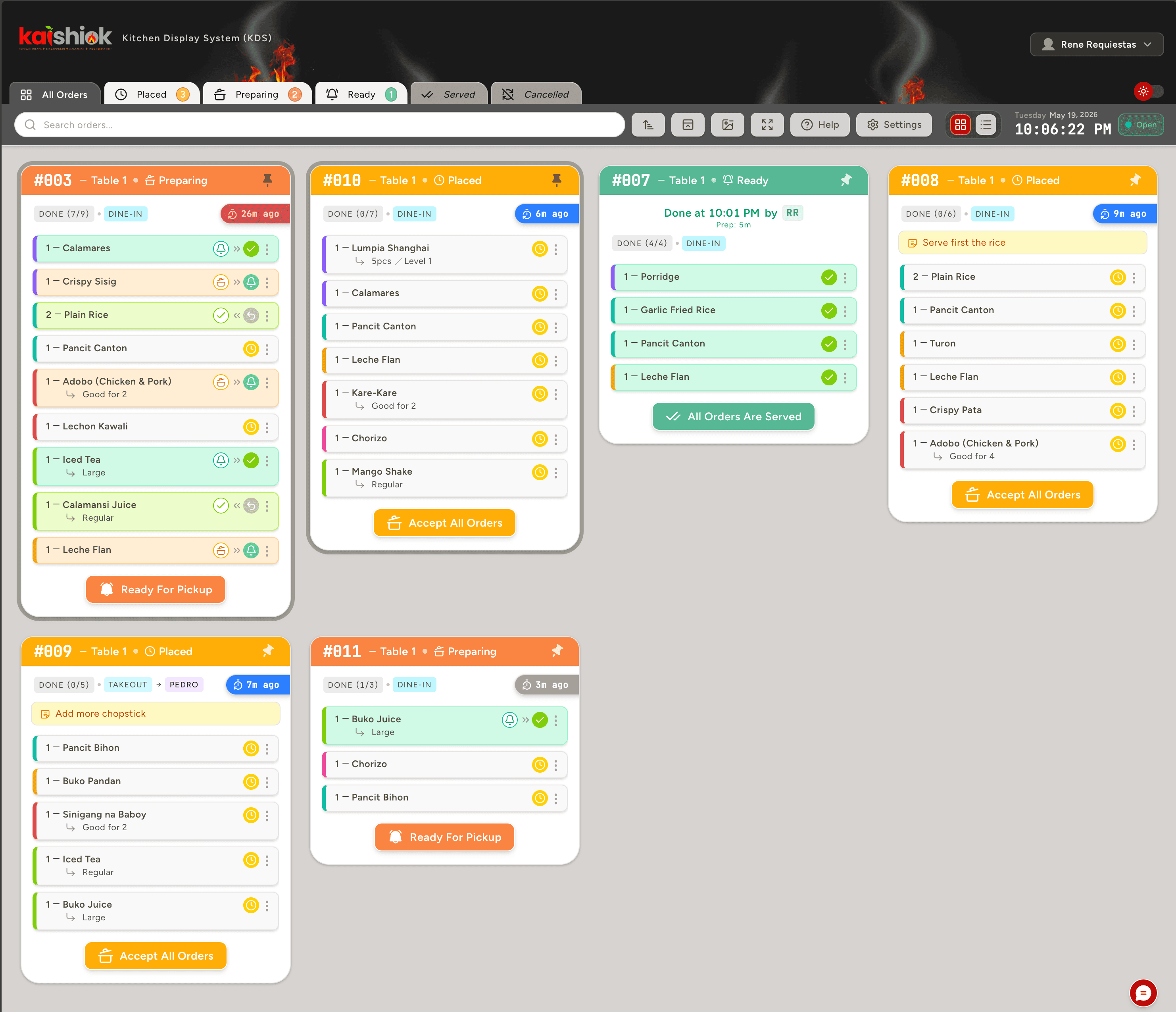 // Kitchen
Simplify operations.
Amplify results.
Everything in One Platform
Stop paying for separate systems. Ordering, kitchen operations, table management, analytics, QR menus, and POS work together seamlessly.
Simplify for everyone
Get your menu online in minutes. Customers order instantly by scanning a QR code. Staff learn the system in hours, not weeks.
Transparent Pricing
No hidden fees. No per-order commissions. No surprise upgrades. What you see is what you pay.
Real-Time Operations
Every order, payment, and status update syncs instantly across all devices so your entire team stays aligned.
Built for the Philippines
Supports GCash, Maya, Card & QR Ph via PayMongo, VAT, service charges, Senior Citizen and PWD discounts, and multiple local languages out of the box.
Turn diners into regulars
Built-in promo codes and a loyalty points program reward repeat customers automatically — no separate CRM subscription needed.
Fewer wrong orders
Orders go straight from the customer’s phone to the kitchen screen — no handwriting, no “sorry, ano ulit?”, no remade plates.
Faster customer service
Guests order the moment they sit down. Tables turn faster, queues shrink, and your staff stop running back and forth.
Less manpower dependency
Run a busy floor with a leaner team. The app takes the orders so people focus on the food and the experience.
Real-time kitchen coordination
Every order, status and update syncs across phone, kitchen and POS instantly. One source of truth, zero confusion.
Manage from anywhere
Live sales, tables and reports in your pocket. Check on your restaurant from home, the market, or the next city.
Easy and simple to use. Smart and advanced features.
Advanced QR code menu & ordering
Each table has its own QR code. Diners scan, browse and order — no download, no waiting. Customver can view real time status of their order from preparing to serving.
Smart inventory & tracking
Link every menu item to its ingredients via a recipe builder. Each sale auto-deducts stock. Low-stock alerts fire before you run out mid-service.
Integrated POS & Payments
Over-the-counter ordering with cash drawer, change calculator and printable receipts from any browser. No proprietary terminal.
Kitchen Display System
PIN login, item-level bump, elapsed timer, color-coded thresholds, sound alerts, compact mode.
Menu & Category Builder
Categories, photos, required & optional modifiers, sizes, add-ons. Drag to reorder/sort and smartly link to inventory stocks.
GCash, Maya, Card & QR Ph
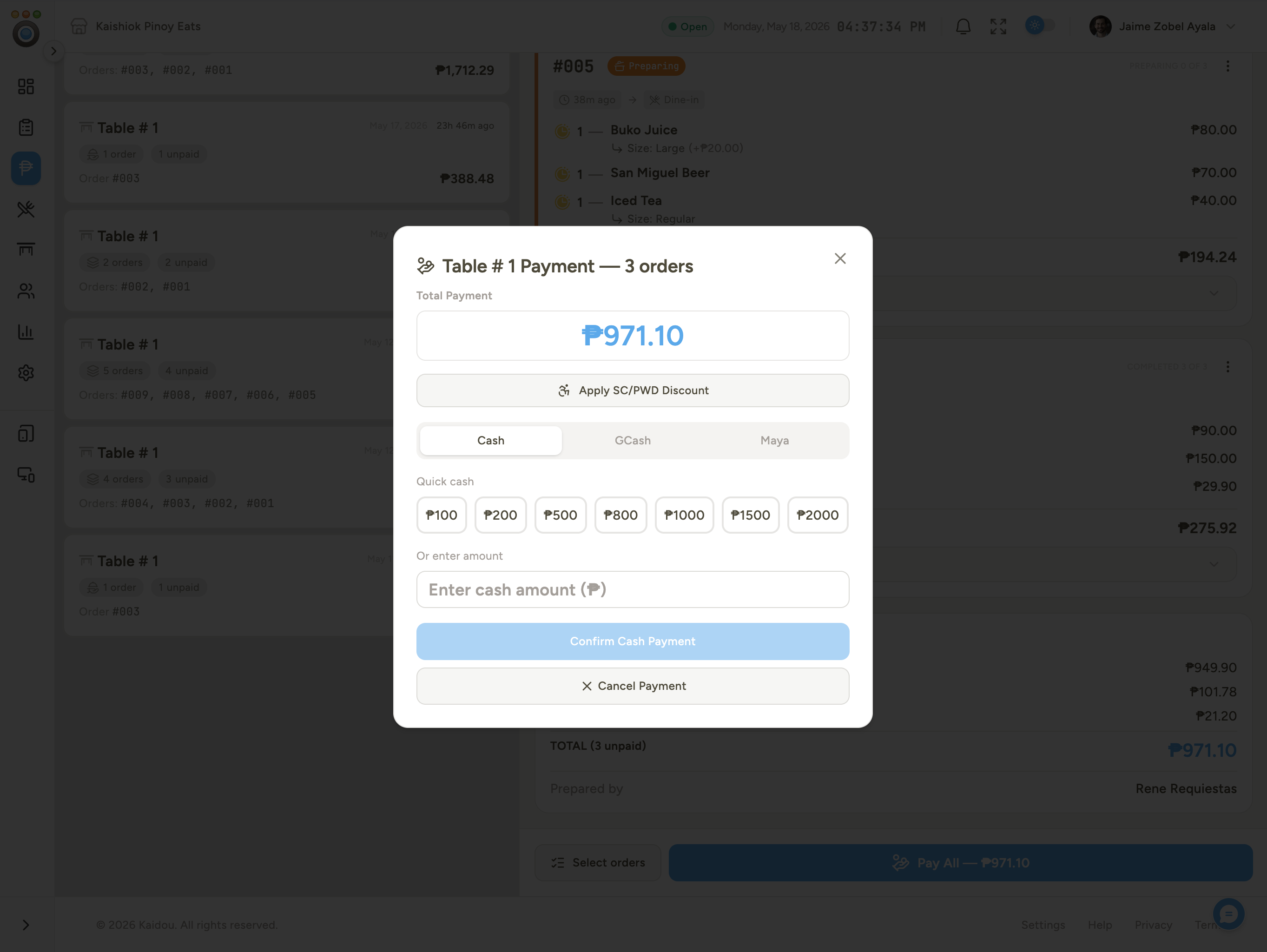
Full Philippine payment flow, powered by PayMongo — over-the-counter with quick-cash buttons, or a secure online checkout link. No commissions, no card fees passed to diners.
Order online — no table needed
Customers browse your menu and checkout remotely for pickup — from home, the office, or on the way — and pay online before they arrive. No QR scan required.
Promo codes & loyalty points
Launch claim-to-wallet promo codes and a points-per-peso loyalty program. Customers earn and redeem rewards from their own account — no separate CRM tool needed.
Customer reviews & ratings
Prompt diners for a rating right after their order is served. Reviews roll up into your dashboard so you can track satisfaction over time.
VAT, SC/PWD & service charge
12% VAT, service charge, takeaway fee, and RA 9994/7277 Senior & PWD discounts — all automatic.
CSV / Excel import
Upload your full menu/category and table setup from a spreadsheet in one shot.
Smart upsell engine
Popular, new, promo and related-item suggestions surface in the item drawer to lift ticket size.
Multi-floor table canvas
Drag tables on a canvas of your real floor. Multiple zones, three views, bulk QR download.
Table merging & split bills
Combine tables into one session for groups. Collect partial, per-session or combined payments.
GPS geofencing
Optional anti-fraud — verify the diner is inside the venue before allowing orders, auto-expire on exit.
Call-staff button
Diners tap to call a waiter. Live status pill on the app, targeted alert on the admin side.
Order follow-up alerts
Auto-prompt customers if a pending order runs long, with a one-tap “ask staff” CTA.
Tri-lingual customer app
English, Tagalog and Cebuano — switch from the phone or the dashboard. Translate once, serve everyone.
Staff roles & permissions
Admin, Manager, Cashier, Cook, Waiter, Barista, Host. Custom roles, granular access, PIN login.
Live analytics & reports
Revenue, peak hours, top sellers, payment split, staff performance — filter and export to CSV anytime.
Group table ordering
The first diner opens a session — others join with a 4-digit code. Every phone at the table orders independently, one shared bill at the end.
Fully branded menu app
Your accent color, your font (30+ options), your corner radius — dark or light mode. The digital menu looks like you, not generic software.
Dine-in & takeaway
Customers choose their order type before confirming. Separate fees, labels, and flows for each — no extra hardware needed.
Promo & featured sections
Pin best-sellers, new arrivals, must-try items, and active campaigns to the menu home screen. Auto-scrolling carousel, managed from the admin.
Supplier & restock management
Create and send restock requests to your suppliers from the dashboard. Mark deliveries received and watch stock update automatically.
Digital bill request
Diners tap 'Request Bill' — the table locks, staff get alerted, and the session auto-closes once payment is confirmed. No pen, no paper.
Installable menu app (PWA)
No App Store, no Play Store. Guests add the menu to their home screen in one tap from any browser — loads fast, works on any phone.
No printed menus.
No waiting. Just order.
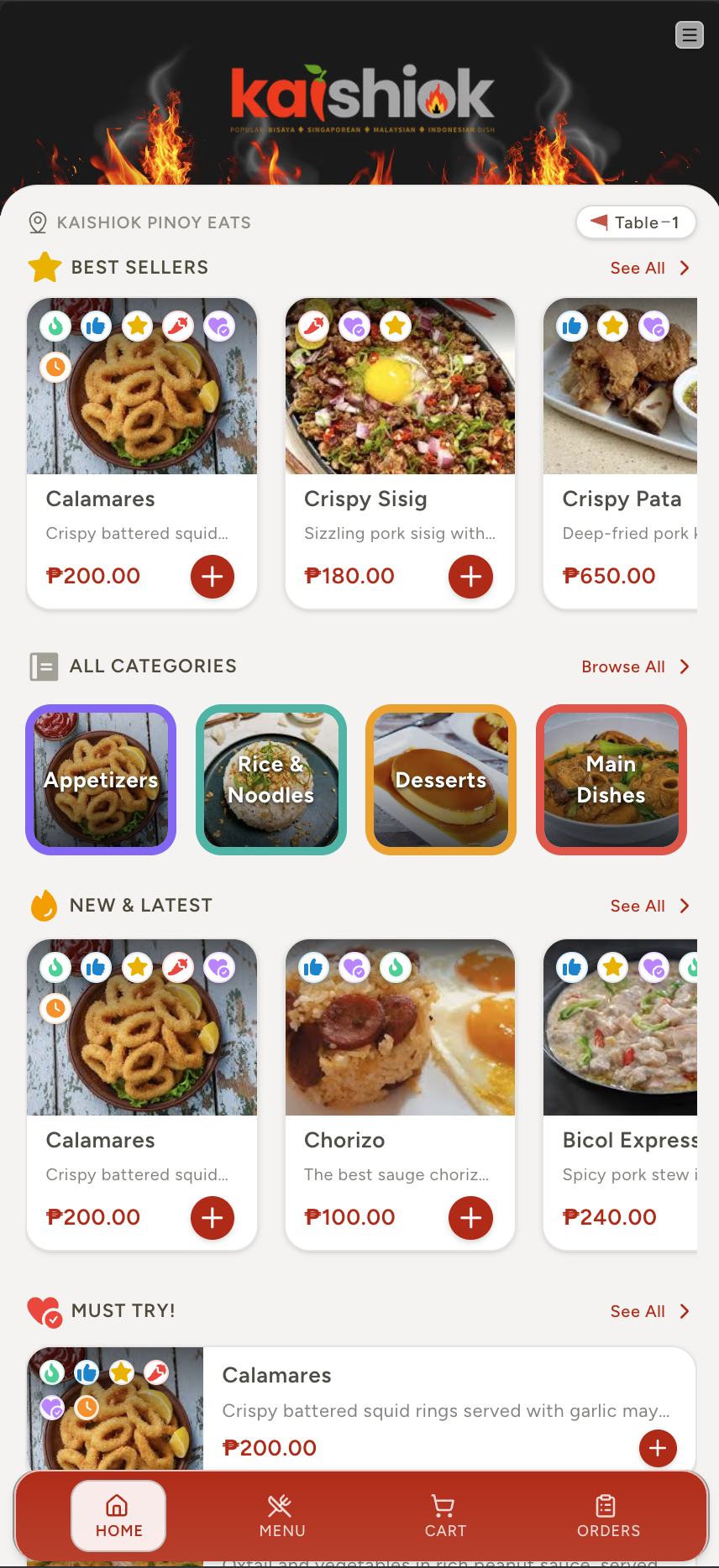
Scan
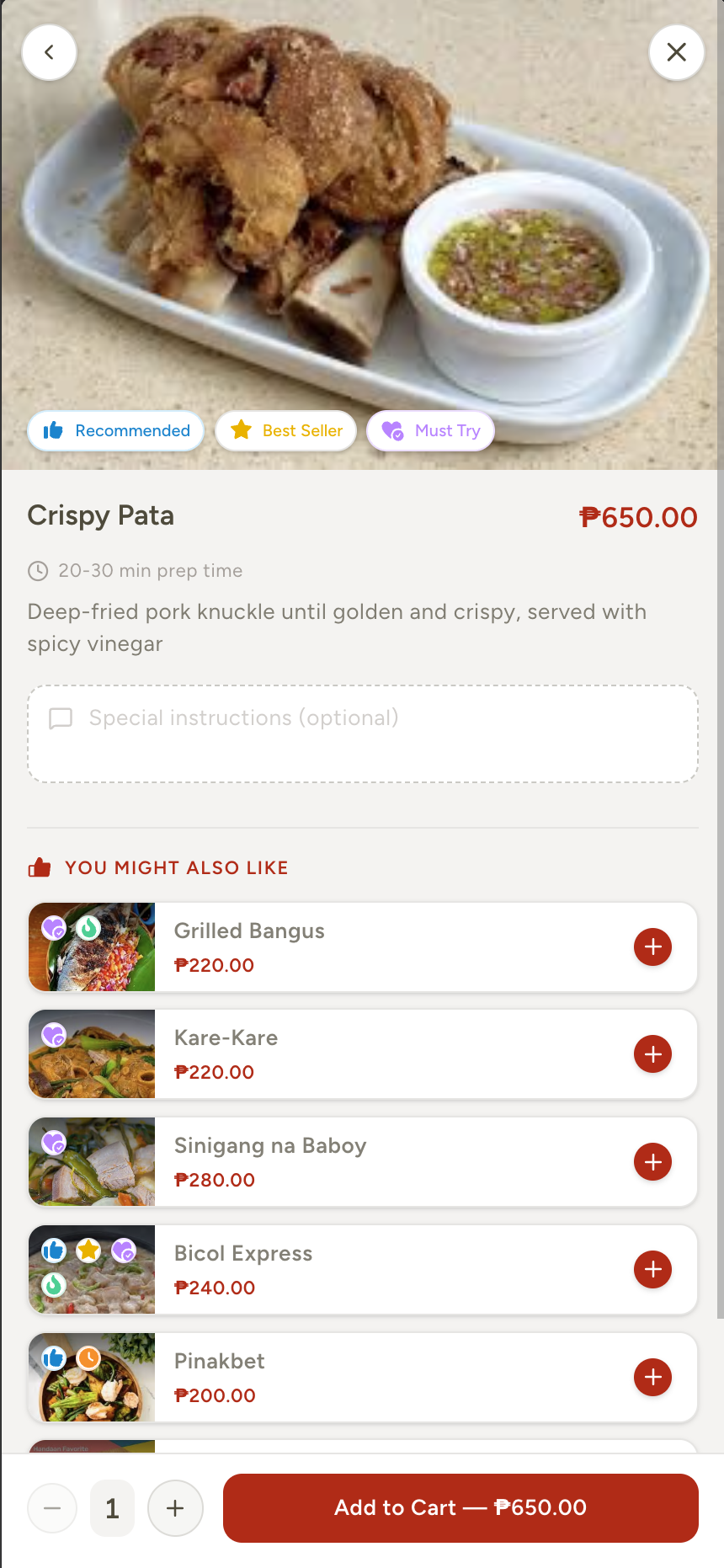
Customer scans the QR code on the table. Instantly sees your branded menu — no app download, no account.
Order
Browse, customise with add-ons, add notes, tap Place Order. VAT, service charge and SC/PWD handled automatically.
Prepare
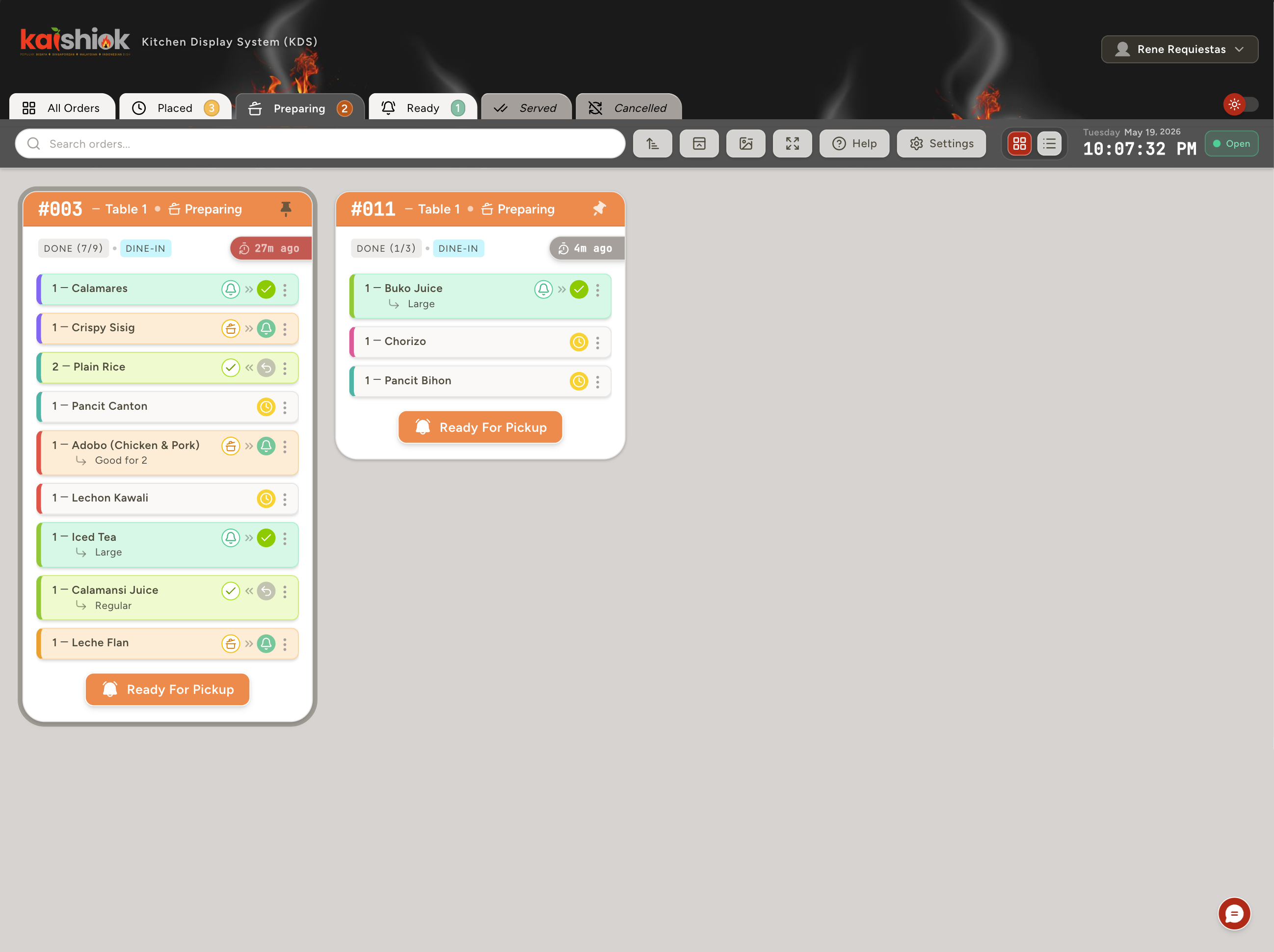
Kitchen sees the order appear on the KDS the instant it's submitted. Staff sets each order/item status to either preparing, ready or served.
Serve & Pay
Customer gets a live “Ready” ping. Staff take payment — Cash, GCash or Maya — and close the order.
Built for modern restaurants. Designed for growth.
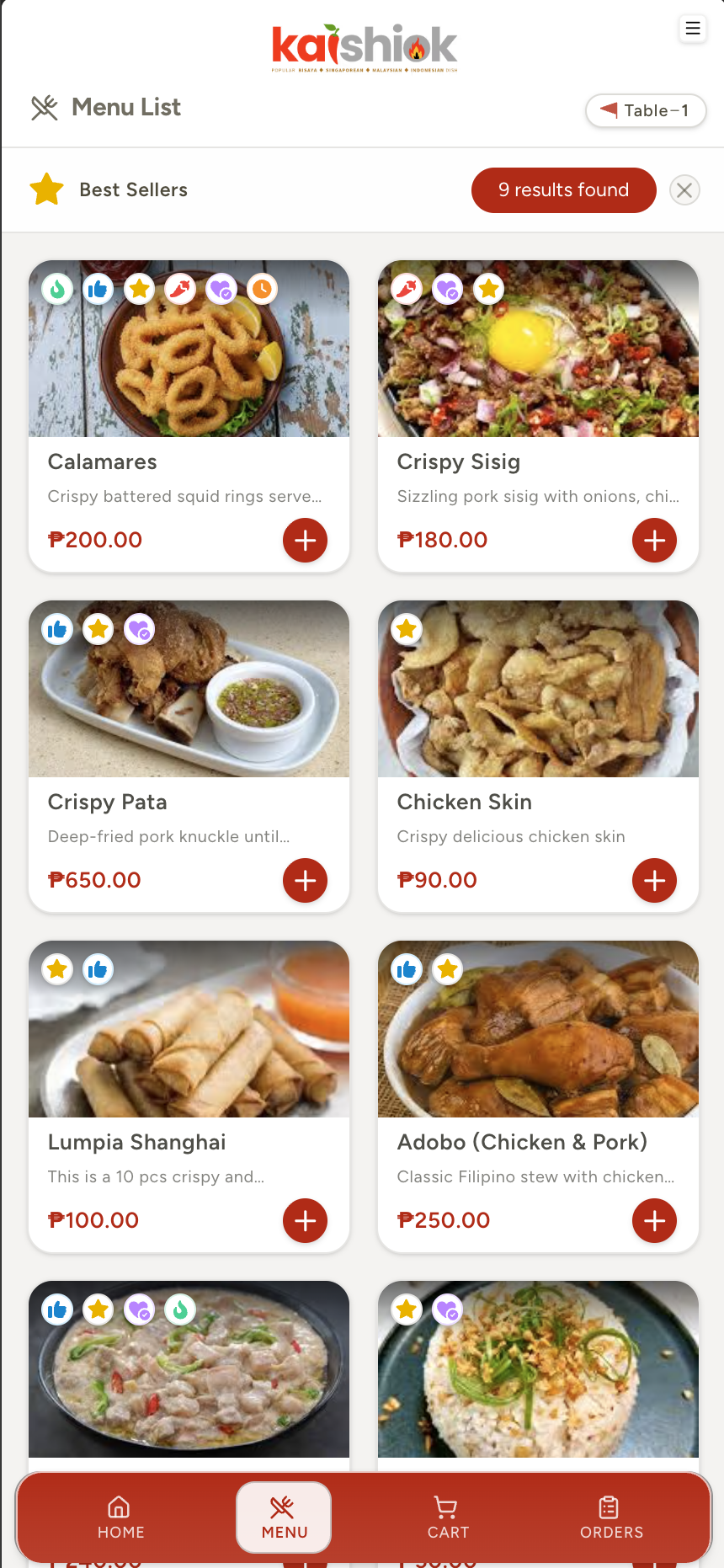
The Customer App
Customers scan, browse, customise and order from their own phone — no downloads, no waiter needed.
- Guest or registered user for online ordering
- Customer portal for registered user (configurable)
- Scan Table QR Code to access menu
- Design light & dark modes option
- Customizable UI look and feel
- Live order timeline (Pending → Ready → Served)
- Order online for pickup — no table or QR scan needed
- Online checkout via GCash, Maya, Card or QR Ph (PayMongo)
- Claim promo codes & earn loyalty points on every order
- Rate and review your order after it is served
- English, Tagalog & Cebuano Language
- Upsell for menu items
- Call-staff support for any request
- Table session sharing on-demand
- Secured session configuration
- And more...
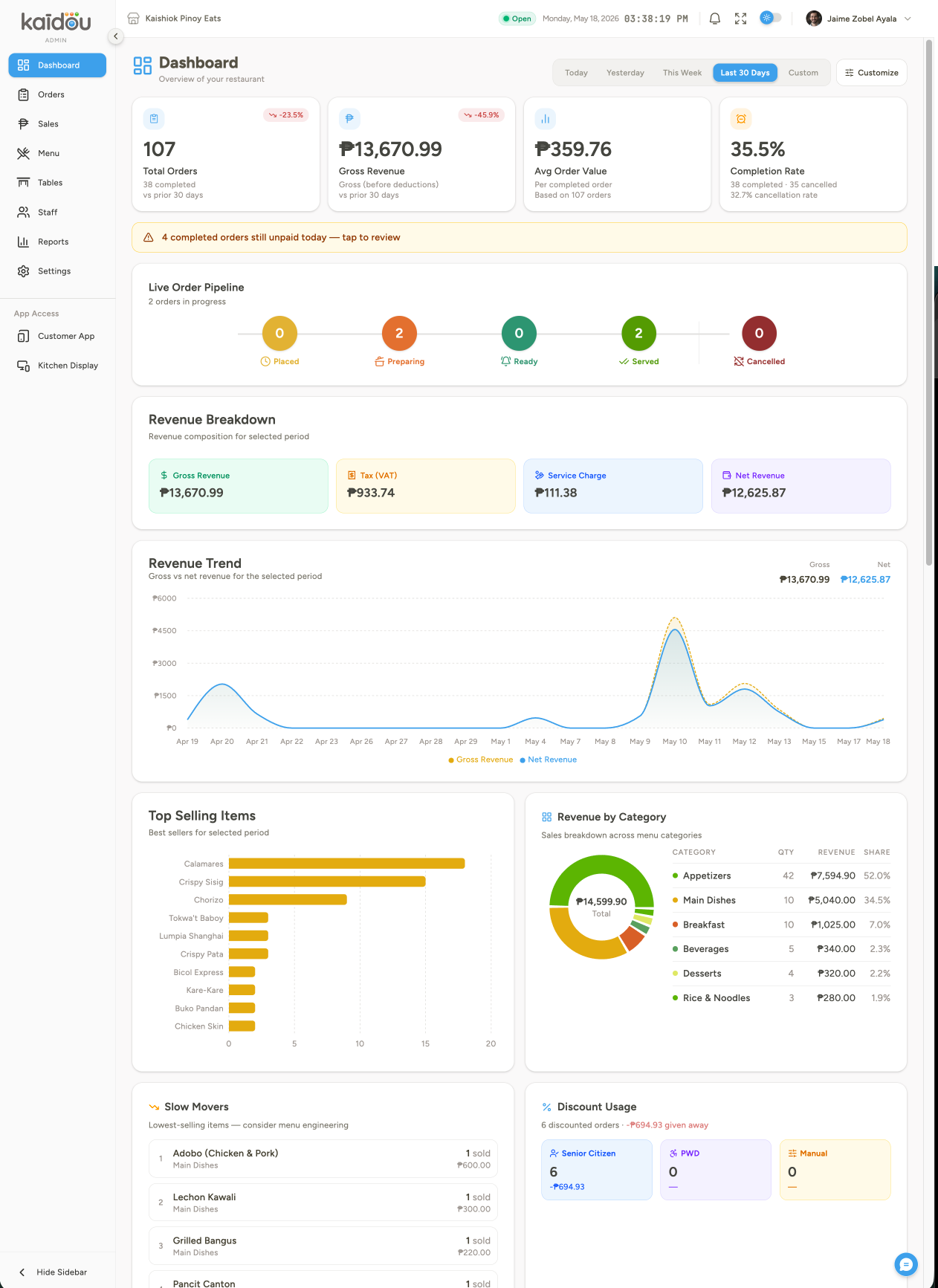
The Admin Portal
Manage and configure menu items. orders, tables, staffs, POS, sales, inventory, reports/analytics, etc — in one powerful administrative control.
- Individual staff permission role-based views & controls
- Build and manage digital menu/categories items
- Advanced manager for restaurant table/floor plan setup
- Robust reports, live revenue, charts & KPIs
- CSV / Excel import-export for menus/tables setup
- Centralize control for all app features/settings
- Manage all business app control operation
- Message alerts notifications
- Configurable session manager for customer tables/orders
- Customize UI Branding for customer and kds apps
- Built-in POS & online payments — Cash, GCash, Maya, Card, QR Ph (PayMongo)
- Integrated Smart Inventory System with recipe-based stock tracking
- Marketing, promo codes and Loyalty Program support
- Customer reviews & ratings dashboard
- And more...
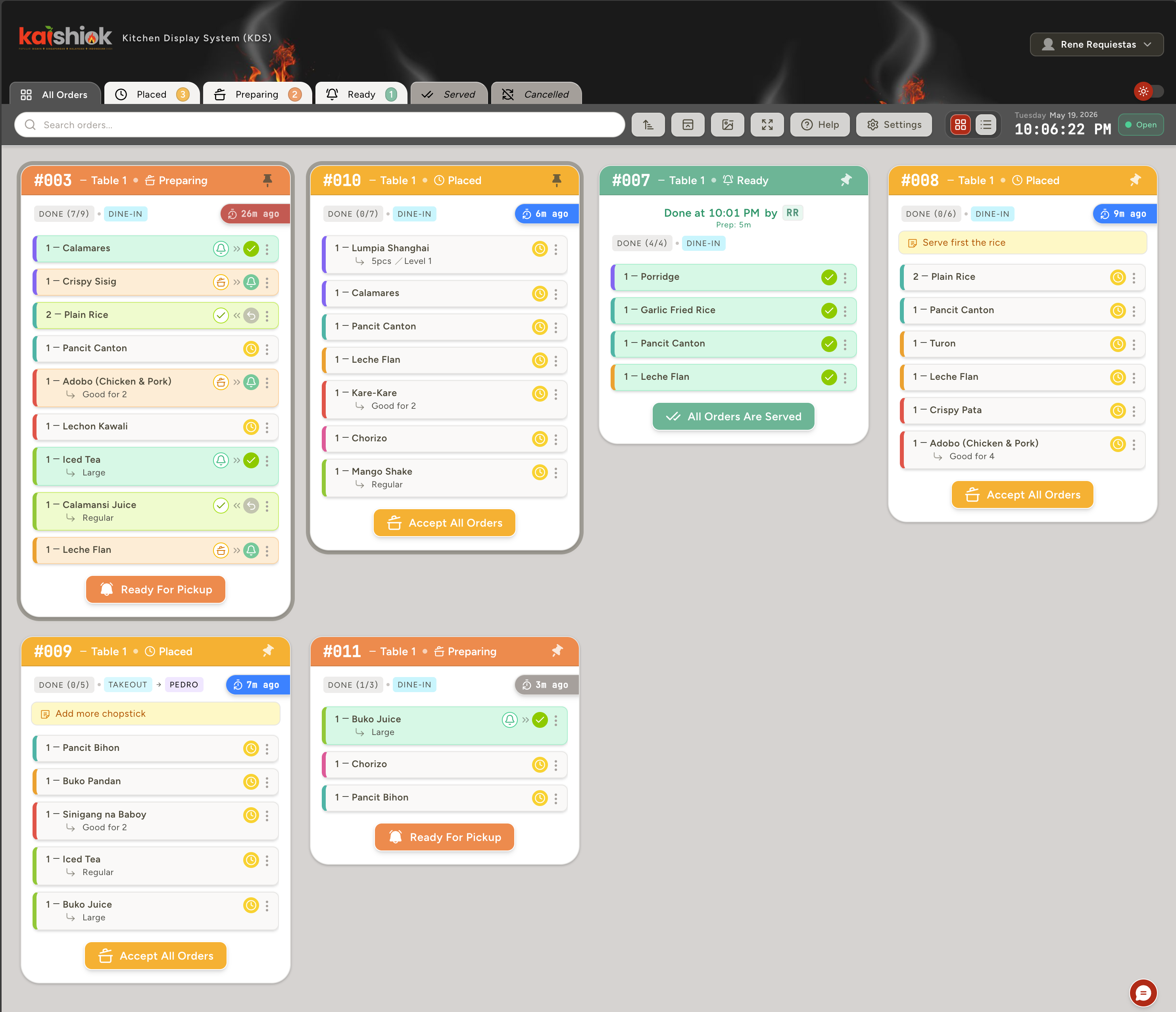
The Kitchen Display
Large-screen KDS for the back-of-house. Color-coded by age, station-grouped, item-level taps.
- PIN login — no email needed
- Time-based color alerts (customizable)
- Set and marked item-level status by one tap
- Set and marked order-level status for all orders
- Order pinning/unpinning
- Distinguishes dine-in, takeaway & online orders at a glance
- Configurable multi-staff support to handle an item/order
- Accessibility screen resolution and dark mode support
- Order sorting and search filters
- And more...
One platform to rule them all.
| Feature | KaiDou | QR menu apps | Traditional POS |
|---|---|---|---|
| Real-time order tracking in the customer app | Included | Rare | |
| Real-time order & table tracking | Included | Rare | |
| Digital menu builder with menu tagging | Included | ||
| Menu item upselling | Included | Paid add-on | |
| Built-in Point-of-Sale | Included | Core (₱₱) | |
| KDS — Kitchen Display System app | Included | Paid add-on | |
| Order status (order & item level) | Included | ||
| Floor plan editor + bulk QR | Included | Paid add-on | |
| Staff roles & permissions | Included | Basic | |
| Customer call-staff button | Included | Rare | |
| GCash & Maya | Included | Limited | Limited |
| Filipino & Bisaya menus | Included | ||
| 12% VAT config (inclusive / exclusive) | Included | Limited | |
| SC/PWD discount flow | Included | Limited | |
| GPS geofencing (anti-fraud) | Included | ||
| CSV / Excel menu import | Included | Limited | |
| Custom branding (colors, fonts, dark mode) | Included | Limited | |
| Live analytics & reports | Included | Basic | |
| Smart inventory & recipe builder | Included | Paid add-on | |
| Group table ordering (shared session) | Included | ||
| Dine-in & takeaway order types | Included | Rare | Limited |
| Promo & featured sections on menu | Included | ||
| Supplier & restock management | Included | Paid add-on | |
| Digital bill request from customer app | Included | Rare | |
| Installable menu app (PWA, no App Store) | Included | Rare | |
| Promo codes & loyalty points program | Included | Paid add-on | |
| Online-mode ordering (no table required) | Included | Rare | |
| Online payments (GCash / Maya / Card / QR Ph) | Included | Limited | Limited |
| Customer reviews & ratings | Included | ||
| Hardware required | None | None | ₱50k – ₱200k |
| Per-order commissions | 0% | Varies | Varies |
| Setup / cancellation fee | None | Varies | |
| Free to start | Yes | Varies |
Simple, honest pricing.
No complicated pricing plans, no add-on modules, no hidden suprise upgrade fees — just a straightforward, easy as ABC pricing options. Start free with all the features — upgrade only when your business needs it.
Free
Try the whole platform with a small shop.
- QR table ordering — no app download
- Customer app, KDS & POS included
- Cash, GCash, Maya, Card & QR Ph payments
- 12% VAT, service charge & SC/PWD discounts
- Customer reviews & ratings
- Limited items, tables, staff & orders
- Basic analytics & reports
- 15-day order history
Premium
Unlimited everything for growing restaurants.
- Everything in Free, unlimited
- Online-mode ordering — no table required
- Promo codes & loyalty points program
- Smart inventory with recipe-based stock tracking
- Floor plan editor + bulk QR generation
- CSV / Excel menu import
- Staff roles & granular permissions
- Full analytics + PDF / CSV export
- Custom branding & QR styles
- Multi-language menu (EN / TL / CEB)
- Multi-station KDS
- GPS geofencing (anti-fraud)
- Customer call-staff button
- Extended order history
Gold
BEST VALUEThe full power of Kaidou, tailored for your brand.
- Everything in Premium, unlimited
- Early access to all new features/apps
- Custom integrations & webhooks
- Multi-branch central dashboard
- Scheduled data archiving
- Dedicated onboarding specialist
- Dedicated account manager
- Custom analytics & data exports
- Priority 24/7 support
- Custom contract terms available
// No hardware required to start. Cancel any time.
Where KaiDou
is headed next.
We're honest about what ships today and what's being built. Here's the forward roadmap — actively in development, not pie-in-the-sky promises. Every feature listed here is targeted for delivery within 2026. All features with its basic functionalities are inclusive to your subscriptions with no significant or hidden additional charges.
Lalamove-powered delivery
Customers enter a delivery address, see a quoted fee bundled right into checkout, and a Lalamove rider is auto-booked the moment the kitchen accepts the order — with live status tracking.
Scheduled curbside pickup
Order ahead online, pick a 15-minute pickup slot, and get an SMS the instant it's ready — no walking in and waiting at the counter.
Online dine-in reservations
Let guests book a table in advance for a specific time and party size, straight from your branded menu app — no phone call needed.
AI-powered inventory forecasting
Predictive reorder recommendations, wastage pattern detection and demand forecasting — layered on top of the recipe-based stock tracking already live today.
Staff payroll
Track hours, compute pay, and generate payroll summaries for your staff — built right into the admin dashboard.
More customizable themes
Multiple visual themes for the customer-facing menu — beyond light/dark, fully on-brand.
Multi-branch support
Operate multiple branches under one centralised command — for chains and franchise groups.
Frequently Asked Questions. Answered.
Start serving in real time.
Small cart or large chain — the future is digital. Switch the easy way, with no hardware, no commissions, and no complicated setup.